I sell my photos in two main ways: through my online store, and by direct order. Some products are only available by direct order.
Online Store
My online store includes most of the items I sell: prints, digital downloads, clothing, and other merchandise. Even if you prefer not to order online, you'll still need to know how to use my online galleries to identify the items you want to buy.
Finding Your Photos
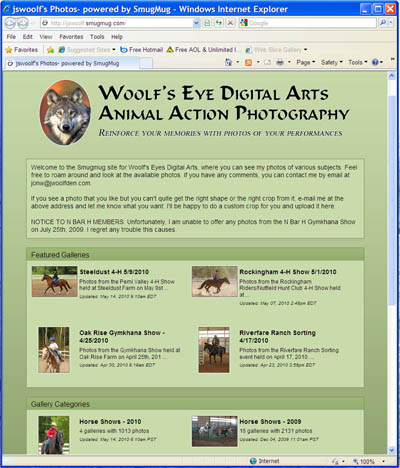
On the front page of my online store (shown at right), you'll see a long list of separate photo galleries. Each gallery is a different show or event that I've photographed, identified by the stable name and date. Click on the show name to see the photos from that show.
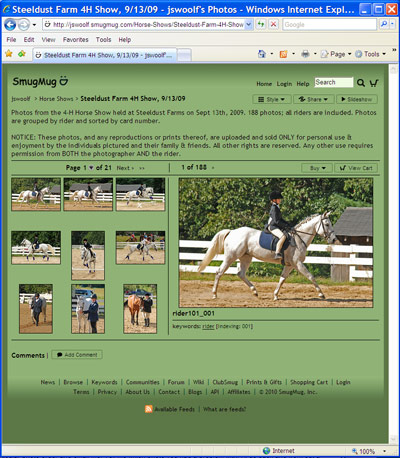
You should see a new page like the one at left, showing many small 'thumbnail' images on the left, and a single larger photo on the right. Within each gallery, the photos are typically grouped by rider, so you can quickly find all the photos of yourself, or the rider you're interested in. If it was a show where the riders wore number cards, then riders are labeled by their numbers: rider055, rider070, rider105, and so on. If not, then the riders are simply numbered in ascending order by when I first photographed them: rider01, rider02, rider03, etc.
Ordering Products
When you find your own photos in the gallery, click any of the thumbnails on the left, and a larger version of the picture will be displayed on the right. When you find a photo you want to buy, click the "Buy" button directly above the large photo on the right. This will bring up a pop-up window where you can select particular items to buy. Note the three "tabs" on this window:
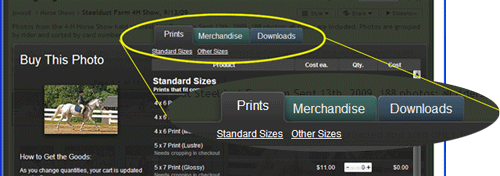
The left tab, labeled "Prints," is where you go to order ordinary photo prints. Click the middle tab, "Merchandise," to see other items you can buy: T-shirts, sweatshirts, coasters, mugs, and more. The right tab, "Downloads," lets you download an electronic version of the picture directly to your computer. This downloaded version can't be printed, but it can be displayed on your computer, or included in emails or on websites.
Once you've selected all the photos and items you want, follow the onscreen instructions to check out. This part of the process should be very familiar if you've ever ordered anything online before.
Cropping Prints
At some point during the checkout, you might be asked to crop one or more of your pictures. This happens when the print size you select doesn't match the shape of the image. You'll see an interactive box that lets you select what part of the photo will be included on the print. All of my photos are composed so that they can be cropped without losing anything important. You should not ever be forced to cut off your head, or your horse's feet, or any other part of the image. If you have a problem with cropping, then cancel that particular photo order and email me. Tell me which photo you had a problem with. I'll go back and work out a crop that works for you.
Direct Order
Ordering through my online store is easiest, for both you and me. However, some of my products, like my Photo CDs, aren't yet available online. I also understand that some people can't use my online store for various reasons. For example, the online store can run very slowly over a dial-up connection. For both reasons, I will also take direct orders.
Store Products
To directly order a store product (print, download, T-shirt, etc.), send me a letter or an e-mail that identifies the product(s) and photos that you want. I will have the items shipped directly to you, and you then pay by mailed check or money order. Digital downloads will be sent as files on a CD.
Photo CDs
A Photo CD is a computer CD-ROM with your photos on it. See here for a full description. To order a Photo CD, send me an email or a letter with the following information:
For a Rider CD: some way to identify the show and rider that you want. I never cover more than one show a day, so the date and location is enough to identify a show. To identify a rider, I need either the rider's card number (if the show used cards) or the name of a photo from my galleries that shows the rider you want. For example, if you want a Rider CD from a show on April 17th, 2010, and you're the rider I've identified as "Rider05" in that show, then in your email you'd say something like "I'd like to order a Rider CD of Rider05 from the show you photographed on April 17th, 2010." I can also use a description to identify a rider and horse, but that's not always as reliable as a card number of rider number.
For a Season or Stable CD: some way to identify the rider that you want. As with the Rider CD, you can identify the rider using either their card number or the name of a photo that shows them.
For a Show CD: the date and location of the show. Please note: I will only accept Show CD orders from the show organizer.
Photo CD Prices
| Rider CD | All photos of a single rider from a single show. Minimum photo count: 10 photos. |
$40.00 |
| Barn CD | Selected photos of multiple riders from the same family or stable, in a single show. Minimum 10 photos per rider. (Note: riders participating in only one or two classes may get fewer photos) | $30 per rider, to maximum price of $210 |
| Season CD | Selected photos of a single rider over an entire show season. Minimum photo count: 20 photos. |
$75.00 |
| Show CD | All photos from a specific show. | $100.00 |
For an additional $5, I'll create a second folder on the Photo CD that includes small versions of your photos, suitable for use on websites or in email.
Payment for Photo CDs must be by check or money order. Sending cash through the mail is a bad idea, and I don't yet take credit cards.